About Tupo
Tupo is a small daily logic puzzle in the style of sudoku, but with a colorful twist.
The goal is to place one number and one color in each tile, so that no row or column contains repeats, and each unique color-number combination appears exactly once. That’s all there is to the rules.
There’s one puzzle a day, starting easier on Monday, and ending with the most difficult puzzle of the week on Sunday. If you want more, there are also four bonus puzzles every week (one for each difficulty level).
FAQ
Installation
How do I install Tupo on iPhone or iPad?
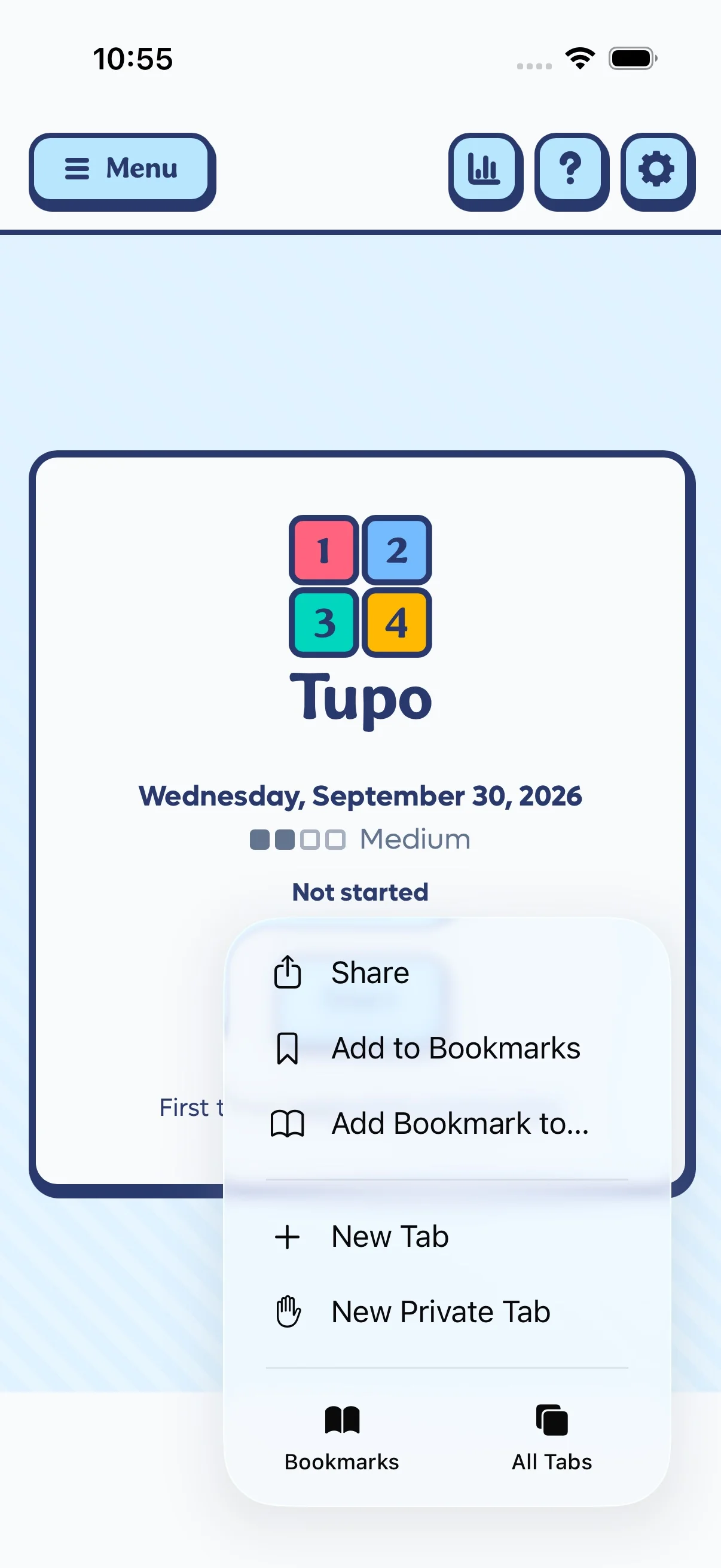
- Open playtupo.com in Safari
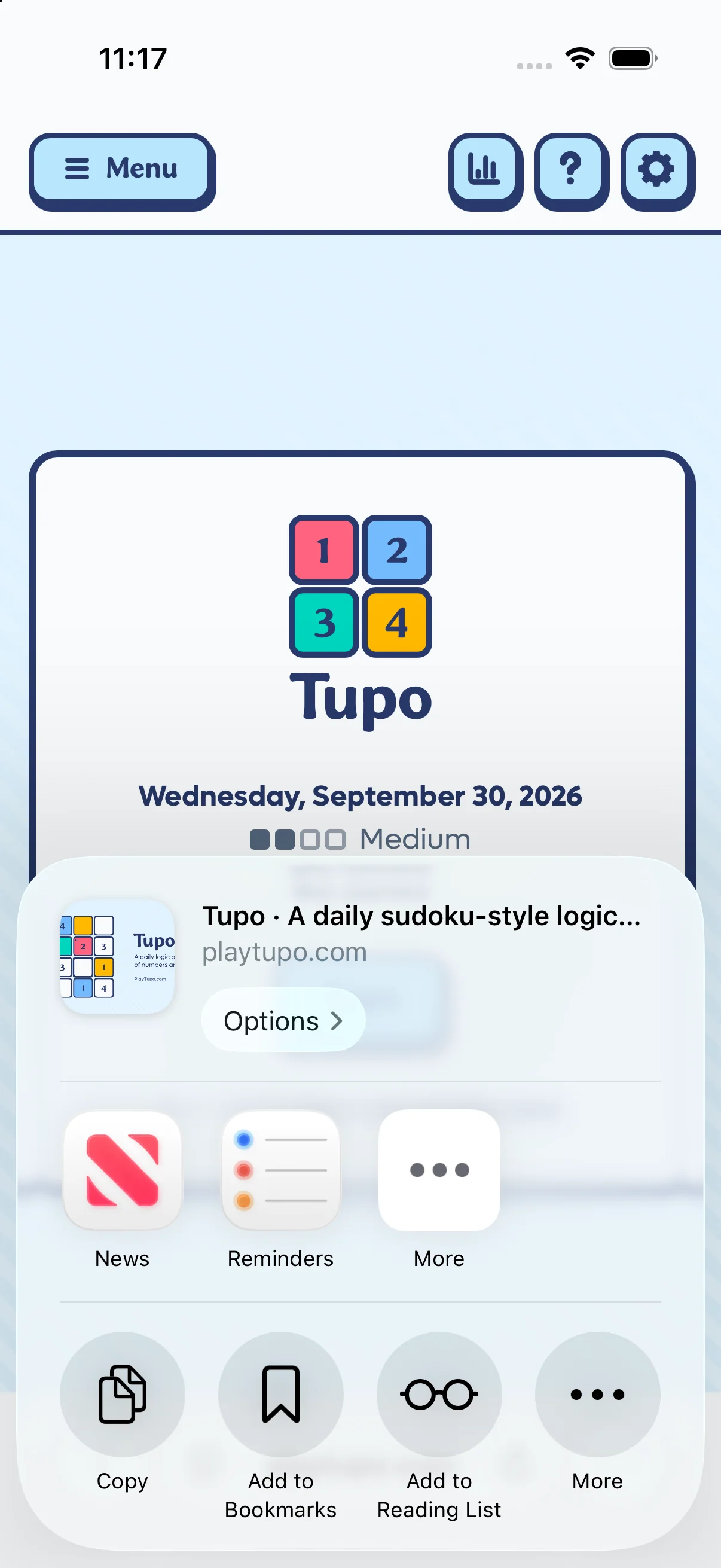
- Open the menu, and tap Share
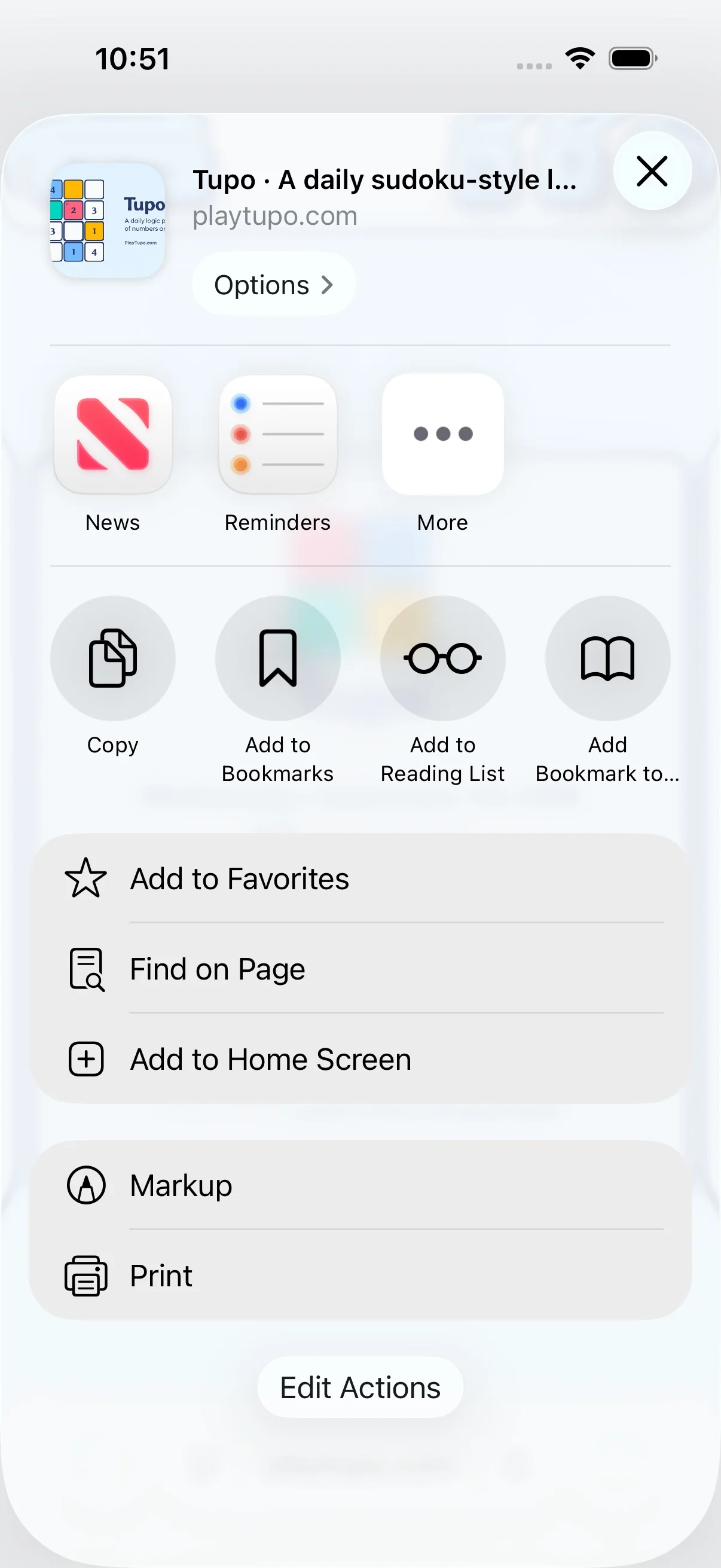
- Scroll down the share menu and tap Add to Home Screen. (You may need to press the second, lower More (…) option before it appears.)
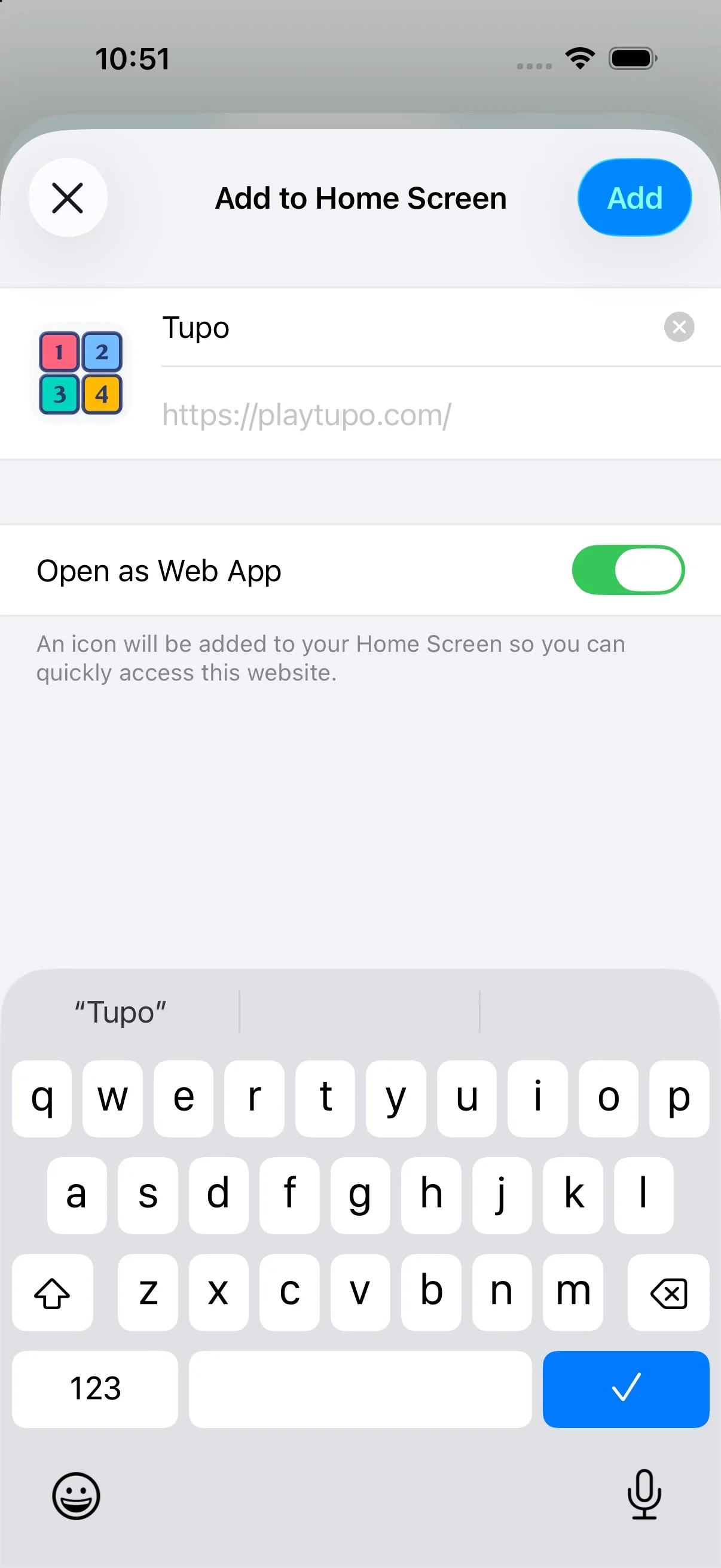
- Leave Open as Web App enabled if shown, then tap Add
(If you can’t find the Add to Home Screen option, scroll to Edit Actions at the bottom of the share menu and add it there.)
Once it’s installed, tap the Tupo icon on your home screen to play.
More help: Apple’s installation guide.
How do I install Tupo on Android?
- Go to playtupo.com in Chrome
- Tap the Menu button on the website. If you see the Install Tupo button at the bottom of the menu that opens, press it and follow the prompts, and then you’re
done! Otherwise, continue with the next steps.
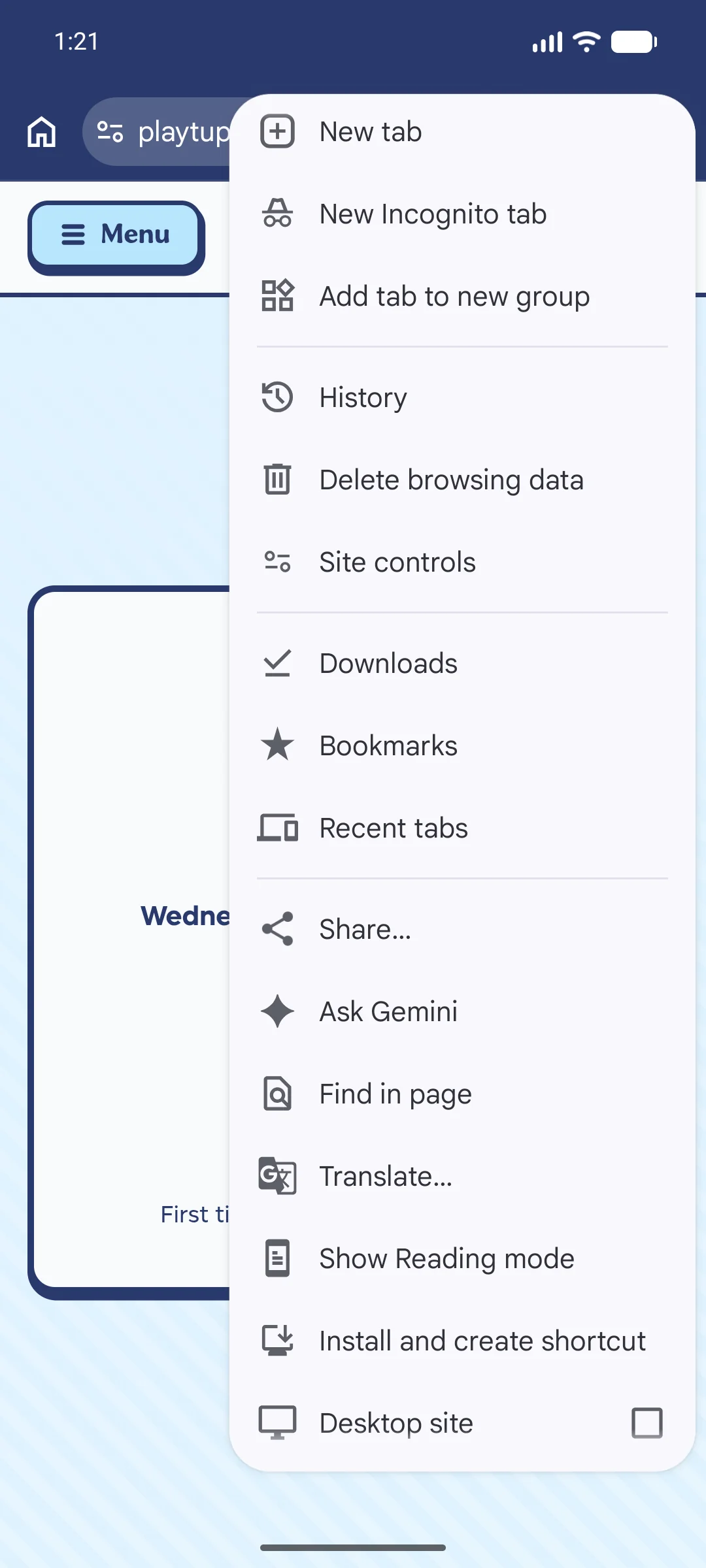
- Tap the three-dot menu (⋮) beside the browser address bar
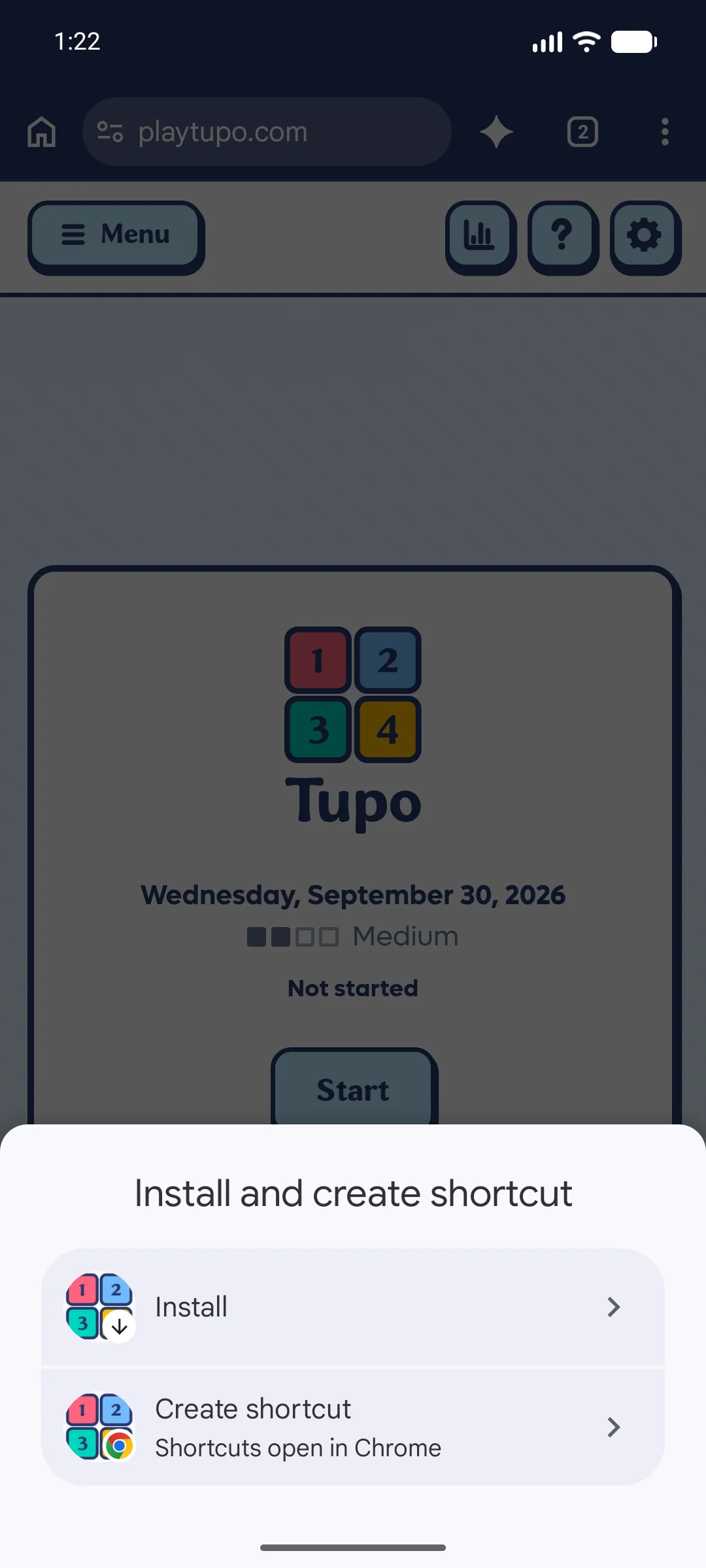
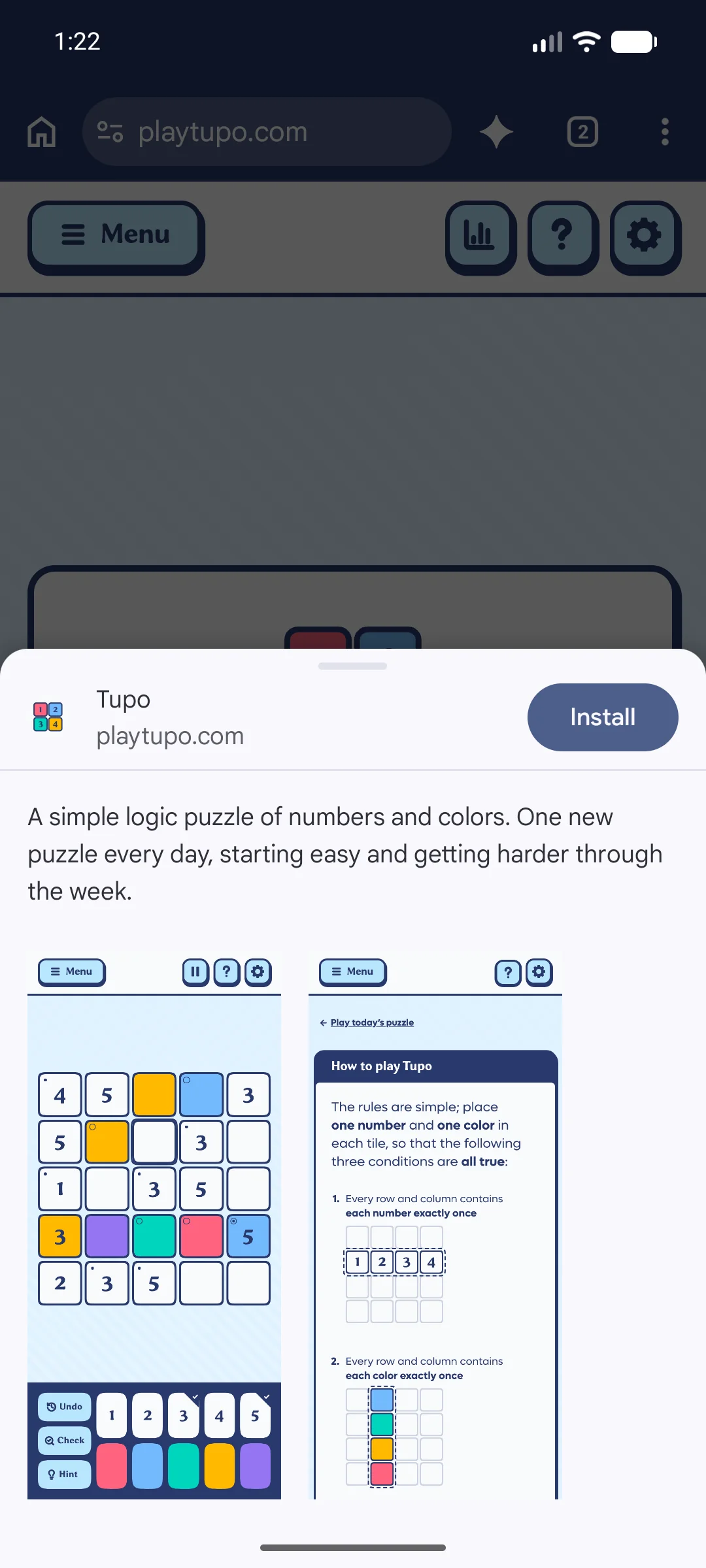
- Choose Install and create shortcut, then Install. (Some versions call this Add to Home screen or Install app.)
- Confirm the installation when prompted.
Once it’s installed, tap the Tupo icon on your home screen to play.
More help: Google’s installation guide.
Why install Tupo?
Installing Tupo puts it on your home screen, so your daily puzzle is always easy to access. It also opens Tupo in its own window, without browser tabs or an address bar, which means the game gets more room on your screen (just like an app).
On iPhone and iPad, installing also helps protect your saved progress from Safari’s automatic cleanup.
Installation is optional; playing in your browser works, too. It’s just more convenient, and a better experience overall.
Can I play offline?
Yes. Puzzles you’ve already opened on this device remain playable offline, as long as your local browser data hasn’t been cleared. You’ll need an internet connection to load new puzzles, however.
Gameplay
When are new puzzles available?
At midnight, your local time. Everyone gets the same puzzle on the same date.
How difficult are the puzzles?
It depends on the day of the week:
- Easy (Monday and Tuesday) is a 4×4 board with plenty of tiles pre-filled to start, and minimally difficult deductions.
- Medium (Wednesday and Thursday) is the same as easy, but with fewer tiles already filled in at the beginning, so you’ll need to do a little more yourself.
- Tricky (Friday and Saturday) bumps the board up to 5×5, and may also require some more tricky deductions.
- Hard (Sunday) guarantees a challenging chain of deductions on a 5×5 board.
It’s worth knowing that Tupo definitely has a learning curve. “Easy” puzzles may not seem easy at first, but once you get the hang of the logic, you’ll be solving them in no time.
Do you ever have to guess?
No; at any given time, all the info you need to make at least one logical deduction is available.
You can guess and play out the consequences if you want to, and undo if it doesn’t work out. But you won’t ever need to do that. (And if it feels like you’re just guessing, always remember rule 3; every color-number combination has to appear on the board exactly once.)
Is there only one solution to each puzzle?
Yes.
Why aren’t there “pencil marks” to mark possible candidates?
Short answer: because they don’t actually help.
It seems like they should, and I originally included them in the game during development without even thinking about it, it seemed like such an obvious choice. But the more I played and tested, the more I realized Tupo is a unique case where pencil marks actually only help when you don’t need them, and aren’t useful at all when you do.
If you’re interested, read on, and I’ll try to explain why.
First: the board isn’t large enough. The pencil mark techniques you might use in sudoku don’t help on a 4×4 or 5×5 board; you can easily see what’s missing at a glance, and solving either layer on its own (if you didn’t need the other) would be straightforward enough that you wouldn’t need marks to do it.
So since marks don’t help with either the color layer or the number layer individually, that leaves the third rule concerning unique color-number combinations.
Across these two layers, a single tile could be one of 16–25 possibilities, depending on board size (as opposed to 9 in traditional sudoku). So the number of marks you end up making quickly becomes just as difficult to manage as the original puzzle itself. Most tiles end up with at least 3–6 marks, with some having upwards of 9–12.
And that’s actually the most important problem: marks don’t make the hard part of the game any easier.
Those “third rule” deductions, where you have to look at colors and numbers together to find a space where only one combination could possibly fit, are the heart of Tupo’s challenge. And though it seems counterintuitive, marks don’t actually help with that aspect of the game.
Take this board, for example, where I’ve marked up all the possibilities in tiny squares:
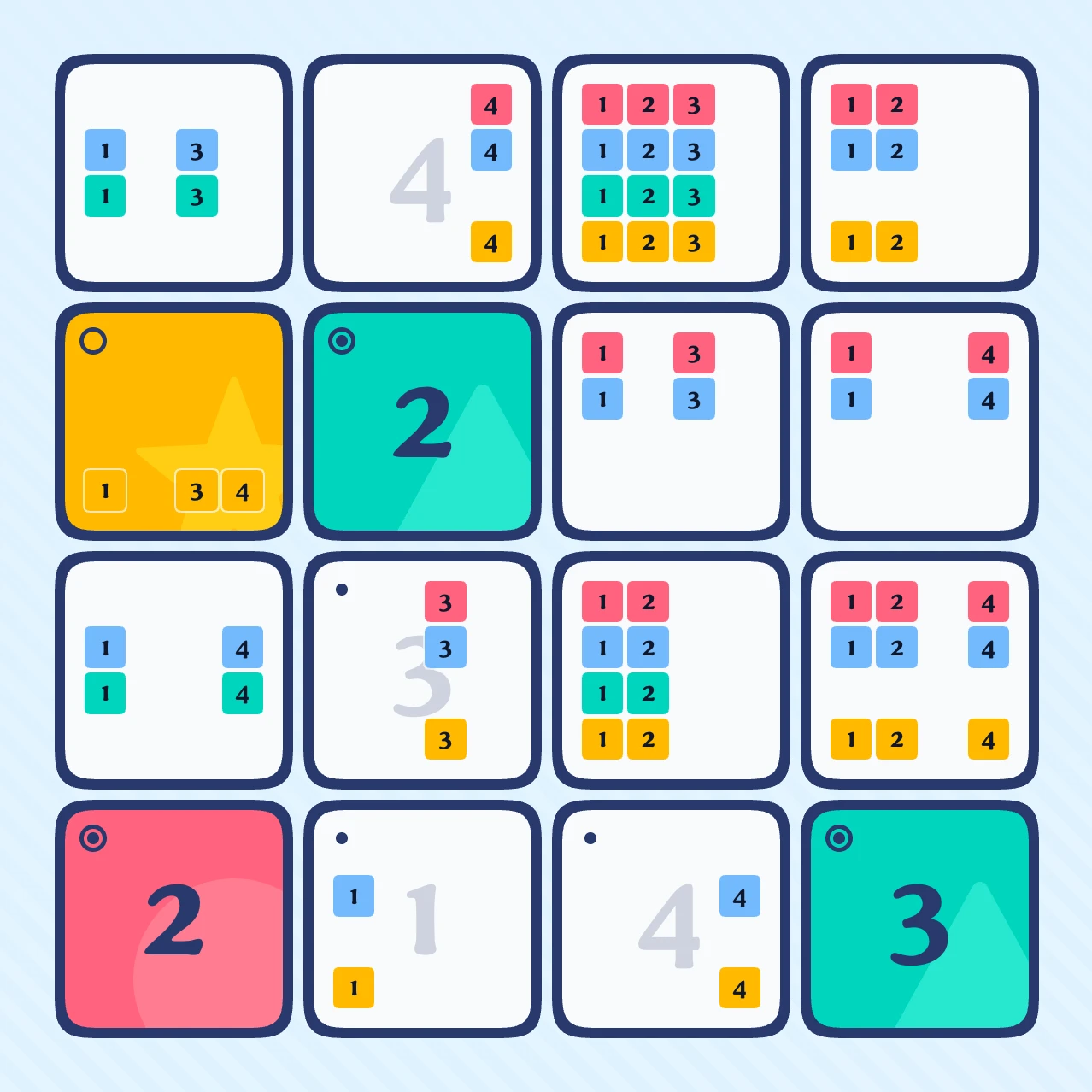
Do the marks help you see the next move?
If you look closely, you might notice there’s only one spot on the board where a green 4 can go. But the thing is: in order to see that, you have to check that tile against the rest of the board anyway—which is exactly what you’d be doing without the marks in the first place. You end up doing all the exact same work, just on a messier board.
I originally said I would consider adding the feature if enough people asked for it. It’s been the most common request so far, and so I poured an inordinate amount of time into trying to figure out a way to give those players what they want. (The screenshot above is from my attempts.)
I’ve concluded there isn’t any good, useful way to include pencil marks—but I don’t think that’s really what the people asking want anyway. I think they’re actually looking for a way to make those difficult deductions easier, and pencil marks just don’t do that. So in place of that feature, I offer this lengthy explanation. I know it’s not the answer some of you might have hoped for, but I believe keeping the game simpler is actually better. In the meantime, using the "highlight related tiles" setting might help.
Can I go back and play a day I missed?
You can find all of this week’s puzzles on the (aptly named) This week’s puzzles page. They’re only available until the following week begins, however.
Data and privacy
Where is my progress stored?
On this device, in your browser. There are no accounts yet to sync your data across devices, but I plan to add them in the near future. Meanwhile, clearing this site’s data clears your history with it. The privacy policy has the details.
Does Tupo use tracking?
No, with only one small caveat.
Tupo counts visits via Plausible, an analytics service that uses no cookies and can’t identify you, so there’s no consent banner to click through. Sending feedback submits what you choose to include.
So while Tupo does track visits, it does so in a way that doesn’t compromise your privacy or collect any personal data.
Behind Tupo
Who made Tupo?
Tupo was designed and built by Josh Collinsworth (that’s me).
I love daily logic games like sudoku, Stars, and Clues by Sam, and I was trying to create a puzzle with rules that were simple enough to hold in your head, but still challenging enough to stay interesting day after day. I wanted it to be easy enough for my second-grader on lighter days, but tough enough for puzzle nerds like me by the end of the week.
Tupo was the eventual result of a whole bunch of prototyping towards that goal. (And I think it was successful; my son and I both enjoy playing.)
(Incidentally, Tupo is my third game app; Quina is a daily word game a little similar to Wordle, but with trickier logic, and Hondo is a word guessing game where you try to guess multiple words in a row to score bonus points.)
Where did the name come from?
It’s made-up. I wanted a short, catchy name that vaguely implied duality, and sounded fun. “Tupo” is the set of syllables I landed on.
I appreciate that Tupo sounds like “tuple” (a programming concept that represents an ordered list of items, not unlike the numbers and colors in the game), but it also sounds like “two,” which is a phonetic nod to the two-in-one nature of the puzzle. Most importantly, though: it sounds playful, it’s simple, and it’s fairly unique.
How do you pronounce “Tupo”?
Tupo is pronounced “TOOP-oh.”
Is Tupo an original game?
For the core mechanic, no. The underlying structure is called a Graeco-Latin square, which has been around since the 1700s. That part isn’t original, and you can even find 9×9 sudokus with this same general concept applied.
Tupo’s original idea is the design and implementation; shrinking the square allows the uniqueness rule to come into play as a deduction tool, without giving players too much to hold in their head at once. Tupo makes the idea bite-sized and manageable as a daily puzzle.
Is Tupo free to play?
Yes, Tupo is completely free to play, and I intend to keep it that way. There may eventually be some optional paid features to help support continued development, but the plan is to keep the core game free (and free of ads and invasive tracking) for everyone.
How was Tupo built?
Tupo is a web app built with SvelteKit and TypeScript, styled with Tailwind and hosted on Netlify. There’s no real backend (yet?); for now, every day’s puzzle is just a JSON file generated ahead of time and committed to the repo, with a scheduled job keeping a buffer of them ready to go.
Everything else happens in your browser and on your device.
What if I found a bug or have a suggestion?
Please let me know on the feedback page! Tupo is new, so all feedback from players is welcomed and appreciated.
Want to learn how to play? See the rules page here.
Found a bug, or have a thought about the game? I’d love to hear it on the feedback page.
Play today’s puzzle